
 View All Posts
Creating Daily Payment Loans in TValue
By Martel PellerinApril 17, 2026
Every so often, you’ll encounter a loan structured with daily payments sometimes five days a week, sometimes seven. The payments may be predetermined, or you may need TValue to solve for them. The natural question is: Can TValue handle daily payments? Yes, it can though it requires a bit more setup than a standard loan.
TValue Settings
As with any TValue calculation, the setup matters.
- Set the Compounding/Computation Interval to Weekly.
- Enter your Nominal Annual Rate.
- On Line 1, enter the loan, date, and the amount.
Build the Daily Payment Structure
Assume payments occur every day of the week.
- On Line 2, start the first payment one day after the loan date.
- If the loan begins on a Monday, the first payment is Tuesday.
- Create seven consecutive daily payment lines, one for each day of the week.
For each day’s payment line (Tuesday through Monday):
- Enter the date for that day’s first payment.
- Enter the payment amount or “U” if you want TValue to solve for it.
- Enter 52 for the Number (representing one year of weekly occurrences).
- Set the Period to Weekly.
TValue may warn you that “Cash flow dates are out of sequence.” Just click OK—TValue will sort chronologically when you calculate.
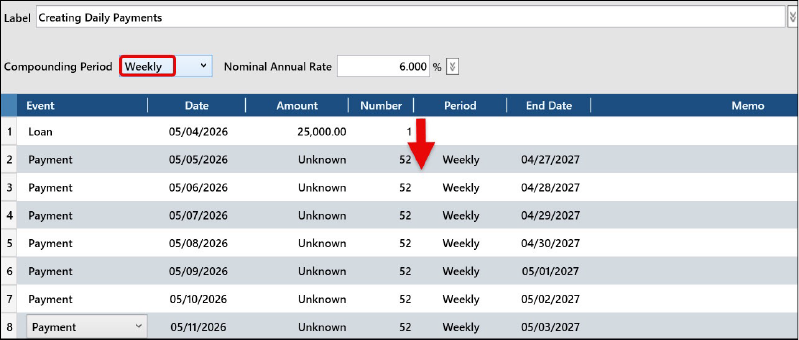
If you only need five‑day‑a‑week payments, use the calendar to identify weekdays and build only those lines.
Save and Calculate
Once you’ve created all 6 or 8 lines (depending on 5‑day or 7‑day payments), save the file. When you click Calculate, TValue will sort the cash flows chronologically. Note: In TValue 6, you can undo if necessary. In earlier versions and TValue Online, you cannot.
Finalize the Schedule
After calculation, you may need to make adjustments:
- Potentially remove holidays.
- Use the calendar to identify them and enter zero for those dates. In TValue 6, the built‑in calendar makes this easier.
- Check rounding and amortization.
- If the loan doesn’t fully amortize, add or delete payments as needed.
- To add payments, adjust the last several daily lines.
- If the loan over‑amortizes and goes negative, open the amortization schedule, find the payment where the balance turns negative, then delete all payments after that point.
It takes a bit more setup than a standard loan, but with the right structure, TValue handles daily payment schedules very effectively.
If you have any questions using TValue software, please give our Support Team a call at 800-426-4741 or email us at support@TimeValue.com.