
 View All Posts
Handling Late Fees in TValue
By Martel PellerinMarch 13, 2026
Late Fee Management Capabilities
TValue is not a loan servicing product, but many users utilize TValue software for managing loans, including amortizing payments, managing irregular payments, and handling interest-bearing late fees.
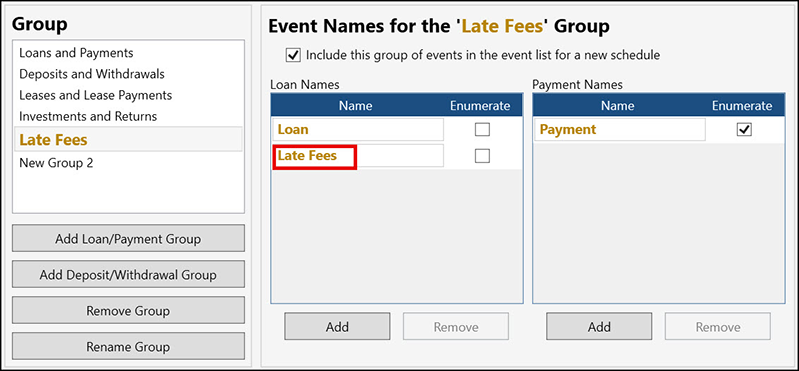
The software can handle interest-bearing late fees as part of the amortization process by either adding the fee as a Loan event or creating a Late Fee event and then including the late fee with the payment. You can create a new Group under Event Names to add a Late Fee. The schedule must start with this Group for the added event to function properly.
Non-Interest Bearing Late Fees
TValue does not directly handle non-interest bearing late fees. However, there are several workarounds available for users dealing with such fees.
-
Memo Field Notes: Users can record late fees in the Memo field, noting the occurrence of a late fee and when it is paid. By using the Expand and Sort features, check amounts and payment lines can be annotated, enabling documentation without including the late fee in the principal and interest payments. This approach avoids affecting the loan's amortization.

-
Same-Day Input: Late fees can be entered on the same day as the payment is made. The late fee would be added to the payment. You can use a Loan event for the late fee. The Late Fee is on the same day but should be the second payment of the day. While this adds the late fee to the amortization schedule, no interest accrues since no time has elapsed for the event. The Memo field can be used for additional notes, and this method documents late fee activity without impacting loan amortization.

-
Export to Excel: The loan amortization schedule can be exported to Excel, where late fees can be tracked in a separate column. Users can add them when the late fee occurs and when it is paid. The disadvantage of this option is the spreadsheet will need to be updated as needed to maintain accurate records.
Support
For questions related to using TValue software, users can contact our Support Team at 800-426-4741 or email at support@TimeValue.com.