
 View All Posts
Handling Variable Rate Changes
By Martel PellerinJune 17, 2026
An Adjustable-Rate Mortgage (ARM) is a popular alternative for a home loan with an interest rate that changes over time based on market conditions. Loans with adjustable or variable interest rates generally require payment recalculations whenever the rate changes. TValue makes this process straightforward by allowing you to insert a Rate Change event and recalculate payments while maintaining the original loan term. In most cases, a Rate Change affects the payment amount while the remaining loan term stays unchanged. TValue handles this by calculating a new payment based on the updated interest rate and remaining balance.
How Rate Changes Work in TValue
A rate change in TValue is handled through a simple, logical sequence:
- Calculate the payment at the initial rate over the full remaining term.
- Change the number of payments at that rate to the period before the change.
- Insert a Rate Change event on the next line.
- Calculate the new payment at the new rate over the remaining term.
- If you have additional rate changes, continue the process.
This iterative approach allows you to build a clean, accurate schedule even when multiple rate changes occur.
Example: $200,000 Loan with a Mid‑Term Rate Change
Initial loan terms:
- Principal: $200,000
- Rate: 5.5%
- Term: 360 months
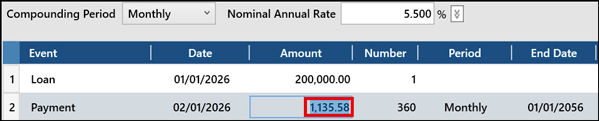
Step 1 — Set up the initial loan:
- Enter 5.5% as the Nominal Annual Rate
- Line 1: Enter a Loan for 200,000
- Line 2: Enter a Payment with:
- Amount: U (Unknown)
- Number: 360
- Click Calculate and TValue computes a payment of 1,135.58
Step 2 — Apply the rate change after 24 months:
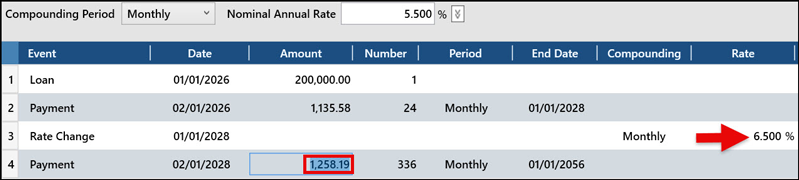
Assume the rate increases to 6.5% after the first 24 payments.
- Change the Number on line 2 from 360 to 24 (only 24 payments occur at 5.5%)
- Line 3: Add a Rate Change event and update the rate to 6.5%
- Line 4: Add a new Payment line with:
- Amount: U (Unknown)
- Number: 348 (the remaining payments)
- Click Calculate and the new payment becomes 1,258.19
You now have:
- 24 payments at 5.5%
- 336 payments (the remaining payments) at 6.5%
- 360 total payments, preserving the original term
If additional rate changes occur, simply repeat the same pattern. Adjust the number of payments at the current rate, insert a new Rate Change event, and calculate the next payment.
The key is to build the schedule in the correct sequence so the total number of payments always matches the intended term.
Adjustable Mortgage Guide
TValue includes an Adjustable Mortgage Guide that automates this entire process. You can model common ARM structures 3/1, 5/1, or 7/1 by entering your assumptions, and the Guide will generate the full cash‑flow schedule for you.
If you have any questions about using TValue software, please contact our Support Team at 800‑426‑4741 or email support@TimeValue.com.