
 View All Posts
Pasting Excel into TValue 6
By Martel PellerinMay 12, 2026
If you’ve ever built a detailed schedule in Excel and wished you could drop it directly into TValue instead of entering each line manually, you’re in luck. TValue 6 includes a handy feature that lets you paste rows from Excel straight into the cash flow matrix, saving time and reducing errors.
Match Your Excel Layout to TValue’s Format
The key to successful pasting is making sure your Excel columns match the structure of TValue’s cash flow matrix. The standard column order is:
Event | Date | Amount | Number | Period | End Date | Memo
For most users, only the first three columns are required:
- Column A: Event
- Column B: Date
- Column C: Amount
Your Excel data must be clean with no blank cells, typos, or formatting issues.
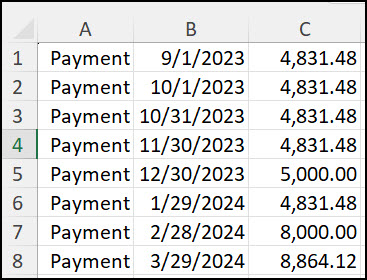
Pasting into TValue 6
Once your Excel sheet is formatted correctly:
- Copy the rows in Excel.
- In TValue 6, click the first cell where you want the data to appear and highlight that line.
- Click the Paste icon on the left side of the Ribbon.
If your schedule includes Rate Changes, Loan Details, or Special Series, you may need to include additional columns to match those fields.
Including Notes or Check Numbers
If your schedule includes check numbers or notes for individual payments, you can paste those into the Memo column. In Excel, these would typically be placed in column G, but the key is keeping them aligned with TValue’s column order.
Two Easy Ways to Get the Correct Excel Layout If you’re unsure how to structure your Excel sheet, here are two simple approaches:
- Build a sample schedule in TValue 6, then copy and paste it into Excel. This instantly shows the correct column order and formatting.
- Use the TValue 6 Help menu. Press F1, go to Index, and search for Excel: Pasting from Excel. You’ll find numerous examples covering Events, Special Series, Periods, and more.
A Time Saving Feature Worth Using
When your Excel columns are in the right order and every cell is filled in, you can paste the entire block into TValue 6 in one step. This feature can dramatically speed up your workflow and help you take advantage of TValue’s calculation power.
For any questions about using TValue software, please contact our Support Team at 800 426 4741 or email support@TimeValue.com.