
 View All Posts
What Triggers Interest on the Failure to Pay Penalty
By Martel PellerinAugust 24, 2026
Interest on the failure-to-pay penalty is driven directly by the notice/assessment dates shown on the taxpayer’s IRS Account Transcript. Both types failure-to-pay penalties are interest‑bearing once assessed:
- Failure to Pay Tax Shown on Return — IRC §6651(a)(2)
- Failure to Pay Amount Assessed — IRC §6651(a)(3)
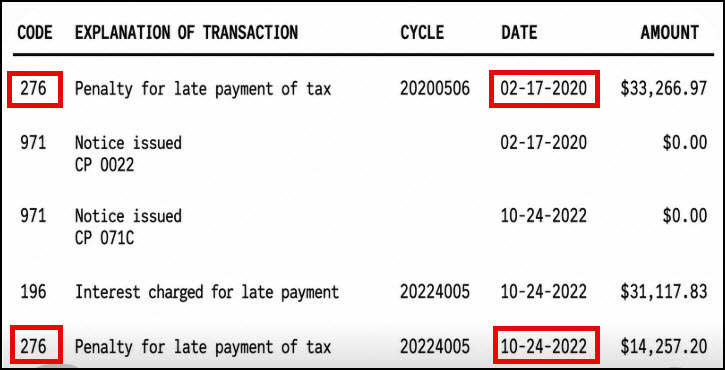
On the transcript, these assessments appear under Transaction Code 276. Each 276 entry identifies the penalty amount and the exact date the IRS assessed it. That date is the trigger for the interest.
For example, if the transcript shows a 276 entry dated 02‑17‑2020 with a penalty of $33,266.97, interest begins accruing on that penalty starting on 02‑17‑2020. If a second notice is later issued, such as another 276 entry on 10‑24‑2022 for $14,257.28, that additional penalty amount begins accruing interest from the second date forward.
How This Works in TaxInterest Software
In the failure to pay input section, you’ll see six blank fields. These fields are used to enter the notice/assessment dates from the transcript. Each date you enter tells the software:
- When a new failure-to-pay penalty was assessed, and
- When interest should begin accruing on that penalty amount.
TaxInterest will correctly compute interest on each penalty only when these notice dates are entered. If the fields are left blank, the software cannot determine the assessment timing and therefore cannot calculate interest on the failure-to-pay penalties.
Another helpful tip when reconciling IRS transcripts is to use the Compute feature. By setting the compute date to the penalty assessment date, TaxInterest will calculate the penalty and interest as of that exact point in time. This lets you verify the transcript amounts and iterate date‑by‑date to confirm the IRS’s calculations against TaxInterest.
If you have questions or need help using TaxInterest software, please give our Support Team a call at 800‑426‑4741 or email support@TimeValue.com.